Overview
Rev D1, March 9, 2026
Configuration Kit 810276 allows you to connect your RDE300i, RC22, RC22M, MT2, or Mars unit to your Windows-based PC for configuration or test.
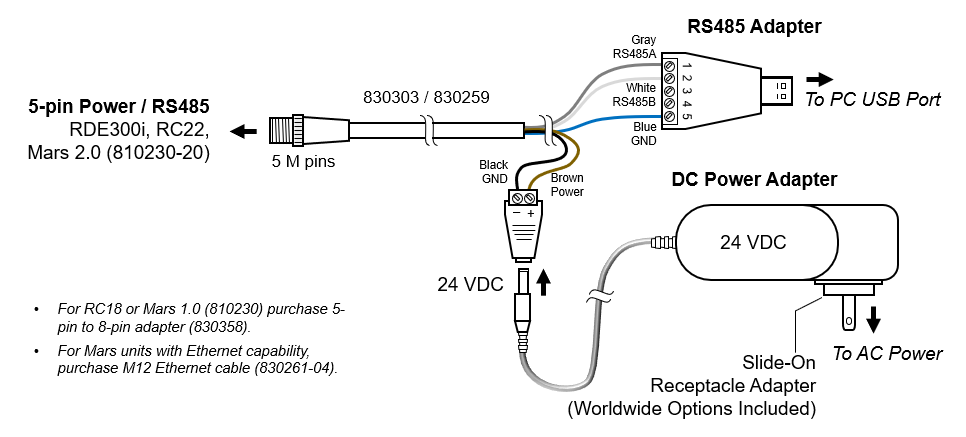
The kit contains a power adapter (AC to 24 VDC) with slide-on worldwide receptacle adapters, an RS-485 to USB adapter, and a 5-pin M12 cable for connecting power and communication to the unit to be configured.
Assembling and Connecting the Kit
- Select and install the receptacle adapter appropriate for your country
- Insert the 24 VDC plug into the cable assembly as shown below
- Connect the 5-pin M12 Power / RS485 cable to the RDE300i, RC22, Mars unit as shown below
- Insert the RS485 to USB adapter into your PC’s USB port
- Connect the power adapter to AC power
- Allow Windows Update to detect the RS-485 to USB adapter and automatically install its driver, or install the driver from the CD included in the kit. You may also download the driver from the link at the bottom of this page.
- Use the Configuration Kit with the appropriate Configuration Manager software for RDE300i, RC22, RC22M, MT2, or Mars as directed in the appropriate User Guide
Software Drivers for USB-RS485 Adapter
The USB to RS485 adapter included with the 810276 configuration kit is the Gearmo Model USA-482422.
Additional information on this part, including software drivers, is available here.
You may also use the Windows software drivers for the FTDI communication chip available in the FTDI-Latest.zip file at the download link at the bottom of this page.
Older Versions
- As of March 2026, Configuration Kit 810276 no longer includes support for 8-pin products, such as RC18 series units or Mars 1.0 (810230) units. Contact our support team for assistance.
- As of May 2024, Configuration Kit 810276 no longer includes support for legacy products requiring Ethernet adapters, such as Mars hardware version 1.0. For these legacy products, contact our support team for assistance.
Was this article helpful?
That’s Great!
Thank you for your feedback
Sorry! We couldn't be helpful
Thank you for your feedback
Feedback sent
We appreciate your effort and will try to fix the article